How to avoid out-of-stock cancellations in dropshipping
To avoid out-of-stock cancellations, keep your store's stock in line with your suppliers on a schedule, so you stop selling an item the moment it sells out. For products that matter most, you can also import the same item from more than one supplier, so you have a backup ready if one runs out.
This guide covers both the automatic stock sync and the manual backup-supplier approach.
What you need
- A ScrapeOra account with at least one supplier connected.
- Products imported and a store connected.
1. Put stock on a schedule
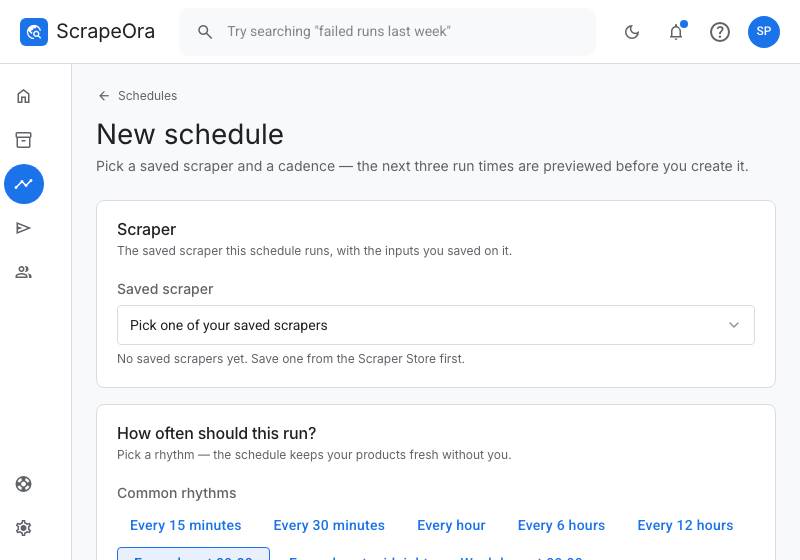
Create a schedule so ScrapeOra re-reads your suppliers often, from every few hours to daily. Fast-moving products deserve a shorter interval, so your store's stock is never far behind the supplier's.
2. Let sold-out items stop selling
On each run, a product that sells out at the supplier is set to zero stock so your store stops selling it, which is what prevents the cancellation. In full sync mode a product the supplier removes entirely is hidden, never deleted, so existing orders still resolve.
3. Add a backup supplier for key products
For your best sellers, import the same product from a second supplier as well. If one runs out, you already have the other's listing and stock in ScrapeOra, so you can switch the product over without starting from scratch.
4. Watch what changed
After each run you can see which items went out of stock and which came back, so you know when to switch a product to its backup supplier or re-enable it.
Common problems and fixes
- A customer still ordered a sold-out item
- Shorten the schedule interval so stock is refreshed more often, and make sure the product is bound to that schedule.
- A product I removed came back
- Use full sync for that connection so items the supplier dropped are hidden, or price and stock only if you manage the catalogue yourself.
- I want a true failover
- Import the product from a second supplier and keep both. ScrapeOra holds both listings, so you can switch quickly, though the switch is yours to make.
Frequently asked questions
- Does ScrapeOra switch suppliers automatically?
- No. It keeps stock accurate so you do not oversell, and holds backup listings you import, but switching a product to its backup is a decision you make.
- How fast can stock sync?
- As often as every few hours, set per schedule. Faster intervals keep stock closer to the supplier.
- What happens to orders for a hidden product?
- Hiding never deletes the product, so existing orders still resolve.