Automate your dropshipping store.
Import, price, and sync products automatically.
Paste a supplier link and ScrapeOra imports the whole product, applies your pricing rules, publishes it to your store, and keeps stock in sync, then places and tracks orders for you. Or read the same product data as JSON from your own app. No code, no spreadsheets, no Sunday-night data entry.
Free plan, no card needed. Works with Shopify, WooCommerce and BigCommerce.
The problem
Stocking a store shouldn't be a data-entry job
If your week includes retyping product titles into a spreadsheet, this section will feel familiar.
Every week, by hand
- Retyping product details from a supplier, one browser tab at a time.
- Prices and stock that changed last week and are still wrong in your store.
- Placing every supplier order by hand, then chasing tracking numbers.
- No real idea what a single order made once supplier costs are in.
With ScrapeOra
- Paste one link, a product or a whole catalog, and the full listing imports for you.
- A schedule keeps prices and stock in sync, and shows you what changed.
- Orders placed with your supplier and tracking written back, automatically.
- Supplier cost, your price and your margin, side by side on every product.
How it works
Four steps, then it runs itself
- 1
Paste a supplier link
One product or a whole catalog from CJdropshipping, Printful, Printify or AliExpress, or a supplier's store on Shopify or WooCommerce.
- 2
Review the products
Full listings import with photos, variants, SKUs, price and stock. Apply your pricing rules and, if you like, rewrite the text in your brand voice.
- 3
Publish to your stores
Send everything to Shopify, WooCommerce, BigCommerce or a Facebook catalog, then put it on a schedule so prices and stock stay in sync.
- 4
Orders fulfil and track themselves
When a customer buys, ScrapeOra can order from your supplier and write the tracking back to your store, and you keep the margin.
Works with
The suppliers and stores you already use
Import from official supplier APIs and publish to the platforms you sell on. Everything marked live works today. Coming soon means it is on the way and not connectable yet.
Suppliers
Where your products come from. CJdropshipping, Printful and Printify connect through their official APIs with a key you save once.
 CJdropshippingOfficial API, auto-ordering
 PrintfulOfficial API, print-on-demand
 PrintifyOfficial API, print-on-demand
 AliExpressImport now; ordering in Beta
Where you sell
Publish and keep in sync across the stores and channels you use.
- Shopify
 WooCommerce
 BigCommerce
 Facebook catalog
 EtsyComing soon
 eBayComing soon
 AmazonComing soon
 TikTok ShopComing soon
 WalmartComing soon
Also supported for publishing: Wix, Squarespace, Magento, PrestaShop, Ecwid, Medusa, Google Sheets and webhooks. See all integrations
What you get
Built so you never think about the plumbing
The hard parts are the product's job, not yours: importing full products, pricing, scheduled sync, placing orders and avoiding duplicates.
Import the whole product
Paste a supplier link and import the complete listing: title, description, photos, variants, SKUs, price and stock. Re-imports update what you already have; they never duplicate.
Pricing rules, applied for you
Set a markup, cost-range tiers, a minimum price, a price ending and a compare-at, with an optional import-duty estimate. Your rules run on every import and sync, and your listing text never touches them.
Scheduled price & stock sync
Re-check your suppliers every few hours, every day, or every week. Prices and stock stay current in your store, hands-free, and you see exactly what changed.
Orders fulfilled and tracked
When a customer buys, ScrapeOra can place the order with your supplier (CJdropshipping, Printful and Printify today, AliExpress in Beta) and write the tracking number back to your store.
Profit you can see
Every product carries its supplier cost, your price and your margin, so you can tell at a glance what each order and each store actually earns.
Publish across your stores
Shopify, WooCommerce, BigCommerce and a Facebook catalog, or Google Sheets and your own webhook. Sell the same products in more than one store at once.
Orders & profit
Sales fulfil themselves, and you can see the margin
Publishing is only half the job. ScrapeOra places supplier orders, writes tracking back to your store, and shows what each order earned, so running the store stops being manual work.
- 1
A customer buys
The order lands in your store and is imported into ScrapeOra with the customer's address and the lines they bought.
- 2
ScrapeOra orders from your supplier
With automatic ordering on, the matching order is placed with CJdropshipping, Printful or Printify (AliExpress in Beta), and only ever an order you've already been paid for.
- 3
Tracking goes back to the store
As the parcel ships, the tracking number is written back to Shopify or WooCommerce and your customer is kept informed, automatically.
You stay in control
- Automatic ordering is opt-in per store, and off by default.
- Only a store order you've already been paid for is ever sent to a supplier.
- Prefer to stay hands-on? A manual ordering checklist works on every plan.
- ScrapeOra never holds or moves your money. You pay your supplier, your customer pays you.
Profit, not guesswork
- Every product keeps its supplier cost beside your price and your margin.
- Pricing rules add your markup, duty estimate and compare-at before anything publishes.
- See what each order and each store earned, without a spreadsheet.
Product data API
Or take the data into your own systems as JSON
Not every product belongs in a store we publish to. Import the products once, publish them as a feed at a stable URL, and read them from your app, a spreadsheet, a second storefront or a no-code tool. No importer to write, no pages to parse, and it stays current on the schedule you set.
Public API
Every plan, including Free
An open URL that answers a plain GET with JSON. The address has an unguessable segment of its own, so it is reachable by anyone who has the link and nobody who does not.
- Up to 20 products per response on Free; more on each paid plan.
- Readable from a browser app directly, with ETags for cheap polling.
- Prices are worked out per request, so a markup change is live at once.
Private API
Growth and Agency
The same feed behind a key. Send it as a Bearer token or as the password in Basic auth; without it the address answers 404, so a leaked link reveals nothing.
- Keys can be named, set to expire, and revoked at any time.
- A plan downgrade pauses a private feed; it is never opened up.
- Agency adds full read-and-write tokens for the rest of the REST API.
What each product record carries
- Title, description, images, variants and SKUs
- The supplier's price and your price with your markup applied
- Stock, and the supplier listing's own address
- When it first appeared in the feed, when it last changed, and when the supplier was last read
One address per account
GET /api/feeds/{your-key}/storefront/products
→ { "items": [ … ], "total": 128 }
Every feed you publish lives under your own account key. Pick which suppliers it covers and whether out-of-stock products are included.
How supplier content works
Full product listings, imported honestly
ScrapeOra imports a supplier's full product listing (title, description, photos, variants, SKUs, price and stock) into your store, and keeps it in sync. You're responsible for your right to sell these products and use their images and text; dropshipping suppliers normally grant this to the stores they supply. ScrapeOra never holds or moves money, and only places supplier orders you've paid for.
What it reads, and how
- Imports the complete listing (title, description, photos, variants, SKUs, price and stock), then keeps price and stock in sync on your schedule.
- You're responsible for your right to sell these products and use their images and text; dropshipping suppliers normally grant this to the stores they supply.
- Connects through a supplier's official API where there is one, and otherwise reads public product pages at a polite rate, honouring robots.txt and each site's terms, never anything behind a login.
- Never holds or moves money. Automatic ordering is opt-in per store, and only a store order you've already been paid for is ever sent to a supplier.
Software only
ScrapeOra is software. It imports product data and keeps your store in sync; it does not sell, ship, or fulfil any products itself, and it never holds or moves your money. When you switch on automatic ordering, ScrapeOra places an order you've already been paid for with your supplier, and the supplier ships it to your customer.
The rules every account agrees to are in our Acceptable Use Policy.
The product
This is what you'll actually use
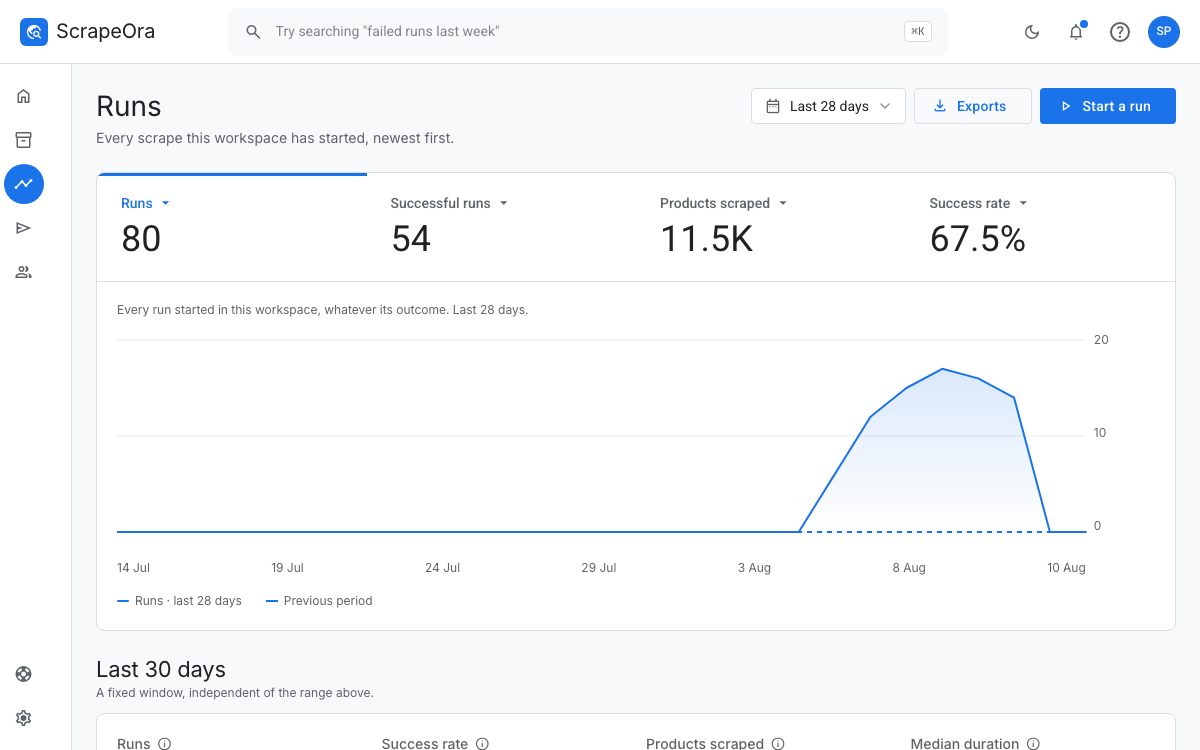
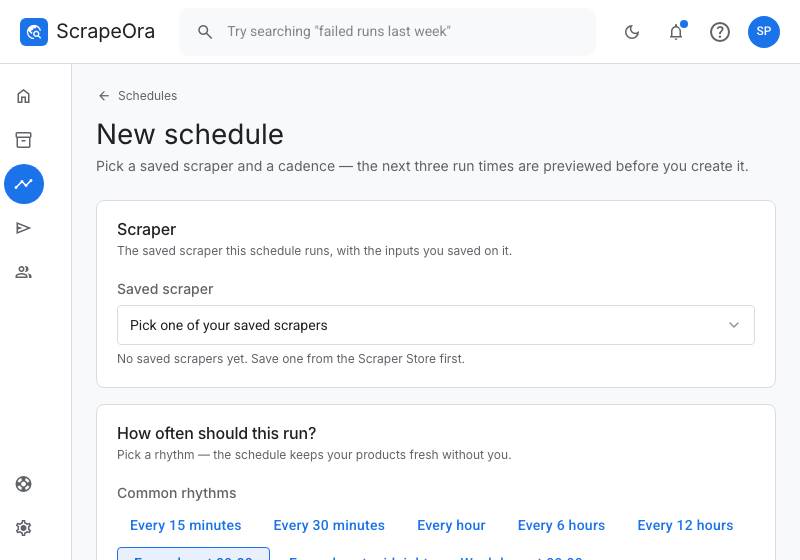
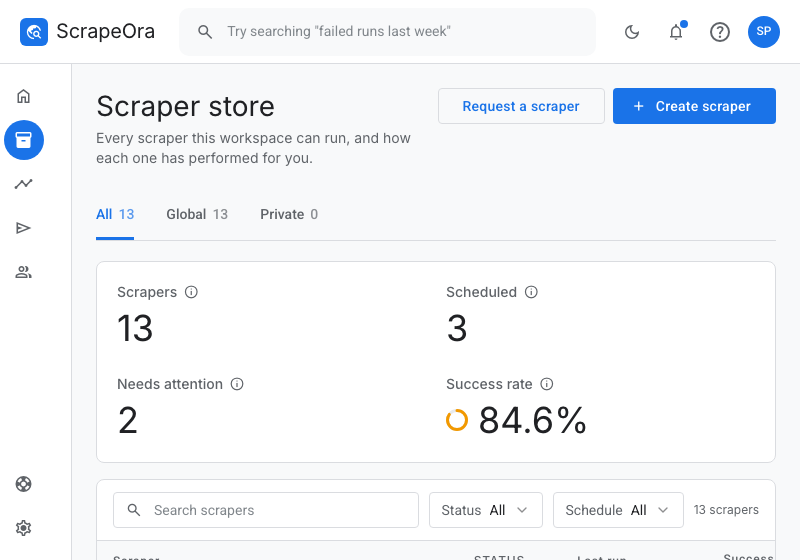
Real screenshots, not mockups. The console is deliberately calm, labelled in plain English, and explains itself as you go.
Who it's for
Made for the person running the store
Not for the person who would have written the connector.
Dropshippers
You find a winner on CJdropshipping or AliExpress at lunch. Paste the link, import it with photos and variants, set your markup, and publish to Shopify before you finish coffee, then let orders fulfil and track themselves.
Print-on-demand sellers
Your Printful and Printify designs become full products in one import, priced by a rule you set once, with variants and stock kept in sync across every store you sell in.
Stores adding a supplier
You already sell. Add a supplier's catalog, keep prices and stock current on a schedule, compare runs to see what changed, and stop retyping product data on Sunday nights.
Teams who need product data in their own tools
You need a supplier's catalog in your own app, a spreadsheet or a storefront you run yourself. Paste the links once, publish the library as a JSON feed at a stable URL, and read it from your code, kept current on the schedule you set, with no importer to write.
Pricing
Start free, pay when it earns its keep
Every plan is the same product. What changes is how many products you can keep in sync, how often, and how many stores you can push them to.
Pay 3 months upfront, save up to 34%
Free
$0/month
Free forever, no card
- 1 store
- Google Sheets, Shopify only
- 25 products in your library
- Syncs every day
- 20 product imports a day
- Automatic supplier orders
- Backup suppliers
- Duty and import tax estimates
- No team seats
- 20 products per response
- Key-protected API
- Full-access API token
Starter
$29/month
Billed monthly. Renews automatically, cancel any time.
- 1 store
- Every store platform
- 500 products in your library
- Syncs every day
- 300 product imports a day
- Automatic supplier orders
- Backup suppliers
- Duty and import tax estimates
- 5 seats
- 500 products per response
- Key-protected API
- Full-access API token
Payments securely processed by Gumroad.
Growth
$49/month
Billed monthly. Renews automatically, cancel any time.
- 3 stores
- Every store platform
- 2,500 products in your library
- Syncs every 6 hours
- 12,500 product imports a day
- Automatic supplier orders
- Backup suppliers
- Duty and import tax estimates
- 5 seats
- 2,500 products per response
- Key-protected API
- Full-access API token
Payments securely processed by Gumroad.
Agency
$99/month
Billed monthly. Renews automatically, cancel any time.
- 10 stores
- Every store platform
- 10,000 products in your library
- Syncs every hour
- 50,000 product imports a day
- Automatic supplier orders
- Backup suppliers
- Duty and import tax estimates
- 10 seats
- 10,000 products per response
- Key-protected API
- Full-access API token
Payments securely processed by Gumroad.
Enterprise
Custom
Limits and price agreed with you, invoiced
- Unlimited stores
- Every store platform
- Unlimited products in your library
- Syncs every 30 minutes
- Unlimited product imports
- Automatic supplier orders
- Backup suppliers
- Duty and import tax estimates
- Unlimited team seats
- Unlimited product api
- Key-protected API
- Full-access API token
Subscriptions and prices
Each paid plan is sold as one auto-renewing subscription per billing term, charged the amount shown once every billing cycle.
| Subscription | Billing cycle | Price (USD) |
|---|---|---|
| ScrapeOra Starter · Monthly | Monthly | $29.00 |
| ScrapeOra Starter · Quarterly | Quarterly | $57.00 |
| ScrapeOra Growth · Monthly | Monthly | $49.00 |
| ScrapeOra Growth · Quarterly | Quarterly | $117.00 |
| ScrapeOra Agency · Monthly | Monthly | $99.00 |
| ScrapeOra Agency · Quarterly | Quarterly | $237.00 |
Prices in USD. Sales tax or VAT is added at checkout where your country requires it. Payments are processed by Gumroad as Merchant of Record. Full plan comparison
All paid plans are auto-renewing subscriptions. Quarterly, 6-month and yearly billing is charged in advance at the discount shown and renews at the same discounted rate for the same period. Cancel any time from Settings → Billing and keep access until the end of the period you’ve paid for. See the Terms of Service and the Refund & Cancellation Policy.
What counts as a “product”?
Each product collected in a run counts once against your daily allowance. Re-syncing the same product tomorrow counts again, because we visit the supplier again to fetch the current price and stock.
What happens when I hit my limit?
The run stops at the limit and tells you in plain words what it delivered. Nothing is deleted and nothing is lost, and the allowance refills at midnight UTC.
Do I need a credit card to start?
No. The free plan needs only an email address and includes the full import-to-publish flow.
Trust
Boring about security, on purpose
Your credentials stay yours
Store credentials and OAuth tokens are encrypted with separate, independently rotated keys, and are never shown again once saved.
Your data does only what you ask
Collected product data is used only for the jobs you run: importing, syncing and, if you switch it on, writing your listings. We never sell it or share it.
Your data is portable
Export any run as CSV, JSON or XML, download everything we hold, or delete your account, all self-serve.
Real support
Tickets are answered by the people who build the product, typically within one business day, in your inbox and your email.
Questions
The things people ask before signing up
Do I need to know how to code?
No. You paste a supplier link and ScrapeOra does the rest: import, pricing, publishing and order fulfilment. There are no templates to configure and no scripts to write.
What exactly is ScrapeOra?
Dropshipping automation for your store. Paste a link from a supplier you work with and ScrapeOra imports the full product (title, description, photos, variants, SKUs, price and stock), applies your pricing rules, and publishes it to Shopify, WooCommerce, BigCommerce or a Facebook catalog. From then on it keeps prices and stock in sync, and can place and track supplier orders for you.
What does ScrapeOra import from a supplier?
ScrapeOra imports a supplier's full product listing (title, description, photos, variants, SKUs, price and stock) into your store, and keeps it in sync. You're responsible for your right to sell these products and use their images and text; dropshipping suppliers normally grant this to the stores they supply. ScrapeOra never holds or moves money, and only places supplier orders you've paid for. The full detail is in our Terms and Acceptable Use Policy.
Which suppliers can I import from?
CJdropshipping, Printful and Printify through their official APIs, where you save your own key once, and AliExpress (Beta). You can also import from a supplier's own store on Shopify or WooCommerce by pasting a product or catalog link.
Can I import a whole catalog, or just one product at a time?
Both. Paste a single product link to import one item, or search a supplier's catalog and import products in bulk. Full listings stream in live as they're found, each with its photos, variants and stock.
Will re-importing a product create duplicates?
No. Every product is matched to a stable source key, so re-importing the same item updates the product you already have instead of creating a duplicate. Variants you add by hand are kept; variants the supplier drops are hidden, never deleted, so existing orders still resolve.
How are prices set? Does the listing writer change them?
You set the rules: a markup (percent, multiplier or fixed), cost-range tiers, a minimum price, a price ending like .99, a compare-at price, an “only raise prices” guard, and, on higher plans, an estimated import-duty line. The rules run on every import and every scheduled sync. Listing writing (included on paid plans) only rewrites the title and description in your brand voice from the supplier's facts, and it never changes your prices, costs, SKUs or stock.
Can I get the product data as JSON for my own system?
Yes, on every plan including the free one. Import the products, publish them as a feed, and call the feed's URL with a plain GET: each record carries title, description, images, variants, SKU, the supplier's price, your price with your markup applied, stock, the supplier listing's address, and when it first appeared and last changed. Free and Starter publish open addresses; Growth and Agency can put a feed behind a key; Agency adds full read-and-write API tokens for the rest of the API. Prices are worked out per request, so a markup change is live immediately.
Can ScrapeOra place and track orders for me?
Yes. Automatic ordering is live for CJdropshipping, Printful and Printify, and in Beta for AliExpress; it is opt-in per store and only ever sends a store order you've already been paid for. Tracking numbers are written back to Shopify and WooCommerce as parcels ship, so your customers are kept informed. Prefer to stay hands-on? A manual ordering checklist works on every plan.
Does ScrapeOra sell or ship products, or touch my money?
No. ScrapeOra is software only. We do not sell, ship, or fulfil any products, and we never hold or move your money. A customer pays you, and you pay your supplier. What you list and sell stays between you, your suppliers and your customers.
What happens if a supplier's website changes?
Official-API suppliers aren't affected. For a supplier store you imported from a link, ScrapeOra rebuilds the connection against the new page and tries again; if something genuinely breaks, the run says so in plain words and support is one click away.
Is my data safe?
Your supplier keys and store credentials are encrypted with separate, independently rotated keys, kept in a vault, and never shown again once saved. Optional two-step verification protects your account, and teams get role-based access. Your data is yours: export it or delete your account any time.
What if it breaks or I get stuck?
Every error says what happened in plain words and what to do next, with a reference code support can look up instantly. Open a support ticket from anywhere in the app, and replies land in your inbox and your email.
Guides
Guides to get you started
Step-by-step walkthroughs for the things people set up first. Each one covers something ScrapeOra does today.
- How to connect CJdropshipping to ShopifyConnect CJdropshipping to your Shopify store with ScrapeOra: save your CJ API key, connect Shopify, import products with photos and variants, apply your pricing, and keep stock and orders in sync.6 min read
- How to connect CJdropshipping to WooCommerceConnect CJdropshipping to your WooCommerce store with ScrapeOra: save your CJ API key, connect WooCommerce with a REST API key, import products with photos and variants, apply your pricing, and keep stock and orders in sync.6 min read
- How to connect CJdropshipping to BigCommerceConnect CJdropshipping to BigCommerce with ScrapeOra: save your CJ API key, connect BigCommerce with a store-level API token, import products, apply pricing, and keep stock and orders in sync.6 min read
- How to connect Printful to ShopifyConnect Printful to Shopify with ScrapeOra: save a Printful token, connect Shopify, import your print-on-demand products with variants, apply pricing, and let orders fulfil and track automatically.5 min read
- How to connect Printful to WooCommerceConnect Printful to WooCommerce with ScrapeOra: save a Printful token, connect WooCommerce with a REST API key, import your print-on-demand products, apply pricing, and fulfil orders automatically.5 min read
- How to connect Printify to ShopifyConnect Printify to Shopify with ScrapeOra: save your Printify API token, connect Shopify, import your print-on-demand products with their variants, apply your pricing, and keep everything in sync.5 min read
Your next product import could be a paste, not an afternoon
Free plan, no card. If it doesn't save you time in the first hour, close the tab.